Migrate
Lift and shift legacy applications
Move existing systems to a new environment with a clear cutover plan.
Dependency mappingCutover planRollback
Teams · Agents · Mesh
Orchard connects an ecosystem of AI agents with your people, teams and tools. Set direction in Orchard Chat; agents take on the work and bring results back. Coordinate swarms across sessions and machines, reuse their output as shared input, and spend less on repeated work.
Services & BPO
Modernize what you run. Build what comes next. Bring us a defined project or an ongoing workstream, and we’ll shape the scope, coordinate delivery and keep your team in the loop.
Engineering projects Ongoing delivery & BPOMove existing systems to a new environment with a clear cutover plan.
Create the foundation for applications, operations, and growth.
Make inherited software easier to maintain, test, and extend.
Take a new product or internal system from brief to working software.
Build separate native applications around the product you already have.
Give recurring software and infrastructure work a team, a clear scope, and a review cadence.
The economics of swarming
Models bill by the word, going in and coming back. Sprawling context, rambling answers, duplicated investigation, overwritten changes and builds that started before the approach was agreed all send the same words again. Orchard’s job is to make that repetition rare. Put a number on it with your own workload.
A change lands in a 4,000-token file.
An overlapping edit removes A’s work.
The agent rereads code, diffs and logs.
Diagnose the failure. Generate the fix again.
150,000 in + 14,000 out, across the several steps it takes to find the problem and redo the work: code and test rereads, diagnostics, reasoning and a regenerated file. Both agents’ intended edits are excluded. This is one of six sources priced in the calculator below.
Build the business case
See what removing repeated work could save your team. Model spend only — no staff time, no productivity claims.
Your numbers
About 20% less modeled AI spend for 25 people. After 5% coordination overhead. Orchard pricing is not included.
Removing 50% of each selected source of repeated work. Monthly savings before coordination costs.
Category amounts are rounded; totals use unrounded values.
| Category | Your AI bill, without Orchard | With 50% of the repetition removed |
|---|---|---|
| Work you wanted | $9,900.00 | $9,900.00 |
| The same work, bought again | $9,066.75 | $4,533.38 |
| Coordination overhead | $0.00 | $721.67 |
Both bars use the same dollar scale. The work you wanted does not move: doing the job once costs the same either way. Only the repeated half is in play.
Check the modeled bill against a real invoice before you trust the rest. If it is too high or too low, change the tasks per day until it matches.
Providers charge by the word, both for what you send and for what comes back. These are the places the same words get sent again. Amounts here show repeated spending before any savings. Untick anything you do not recognise in your own team to update the savings above.
Every step drags along sprawling files and old conversation the task never uses. You are billed for all of it, on every step.
Smaller files · shared memorySmall, single-purpose files and a shared record of what was already learned, so a step carries the part that matters.
Restated background, narration and padding. Generated text is the most expensive thing you buy, and this is the part nobody asked for.
Tight responsesResponse rules that return the decision and the change instead of describing the work along the way.
With no automated check, the model is asked again to confirm its own work, re-reading the same material to answer a question a test could settle.
Test plans · CI gatesA test plan travels with the change and the pipeline runs it on every push, so the answer comes from CI instead of another paid round.
Two workers investigate the same thing in parallel. Both read the same code, both reason it through, and you pay for both.
CoordinationAssigned scopes and a shared record of findings, so the second one starts from the first one’s result instead of repeating it.
A second change lands on top of the first and removes it. It surfaces later, and the whole investigation and fix is bought again.
No overwritingDeclared ownership and a check before writing, so two workers never edit the same file blind.
A full build runs on the wrong approach and is thrown away. The bill covers the discarded attempt and the real one.
Proposal first · predict then implementA short written proposal and a predicted result, checked while changing course still costs a paragraph instead of a build.
Priced at published list rates for the model you selected. None of this is a measured Orchard result: it is your own workload, costed against the practices Orchard enforces.
Monthly opportunity = (people × tasks per day × working days) × the share of tasks each source touches × its repeated tokens at list price, × the share you expect to remove, − what coordination costs you.
| Source of repeated work | % of tasks | Repeated input tokens | Repeated output tokens |
|---|---|---|---|
| Sending more than the job needs | |||
| Answers longer than the question | |||
| Re-reading work to check it | |||
| The same problem solved twice | |||
| One change erasing another | |||
| Building before the approach is agreed |
| Model | Input | Output | Cache read |
|---|---|---|---|
| Claude Sonnet 5 | $2.00 | $10.00 | $0.20 |
| Claude Opus 5 | $5.00 | $25.00 | $0.50 |
| GPT-6 Astra | $10.00 | $50.00 | $1.00 |
The default task is a multi-step agent session, not a single question: an agent reads, runs something, reads the result and continues, and every step re-sends the context so far. That is why per-task token counts run to the hundreds of thousands. Tokens are priced at uncached list rates, so the estimate is conservative for teams already getting cache hits; provider caching is a separate saving. GPT-6 Astra uses its short-context tier. Equal token counts compare prices, not model quality or equal work.
These are API-equivalent costs. On a subscription, avoiding work may preserve your usage allowance without changing the invoice. Annual figures repeat the same month twelve times; they are not a forecast. Staff time, tools, infrastructure, taxes and provider discounts are outside the model, and nothing here is a measured Orchard result.
A capable model maps the constraints. The team checks the plan and shares it.
Shared plan as input
Update the codeStart with the findings. Spend effort on the assigned task.
Shared plan as input
Check the behaviorStart with the findings. Spend effort on the assigned task.
Shared plan as input
Update the runbookStart with the findings. Spend effort on the assigned task.
Shared reasoning gives each agent a head start. Models can be chosen to fit each task.
Illustrative workflow. Savings depend on the work avoided, model pricing and the context carried forward.
Output becomes input
Keep useful findings in shared memory, rules and skills. The next agent reads the relevant result as input instead of spending output tokens rediscovering and explaining the same thing.
Coordinated swarming
Give agents distinct scopes, clear ownership and a shared starting point. Run independent tasks in parallel, share discoveries and bring the results together for review.
Model subsidization
Invest in a capable model for a difficult decision. Reuse its reviewed plan as context for lower-cost or local models on scoped tasks. One model’s work supports the rest of the swarm; your team chooses the models and checks the results.
Input is typically priced below output, and eligible provider prompt caching can reduce the cost of repeated input further. Orchard makes useful outputs available to reuse; provider caching is a separate saving. Compare the full cost of an accepted result, including context, coordination and review.
Configure Chat and worker models separately, with hosted and local options.
DeepSeek + configured providers
Use the hosted models enabled for Orchard Chat. Your team can choose its coordination model independently of the agents doing the work.
Chat has separate Text, Thinking and Files selections. The models available depend on your configuration and provider access.
Harness-specific model settings
Dispatch through supported runtimes such as Codex and Claude Code. Worker sessions use their own model settings; changing Chat’s model does not change theirs.
The agent runtime and its configured dispatch defaults determine the worker model. Include those sessions, their tools and review work when assessing total cost.
Local runtime + model of your choice
Use compatible local models through a configured runtime. Hosted DeepSeek access and an open-weight model running locally are different deployment choices.
Local Chat needs a ready runtime and a model that supports its required capabilities, including tool use. Hardware capacity, setup and operation still have costs.
Include model usage, repeated context, parallel sessions and review in the cost of an accepted result.
Team coordination
Follow who exchanged work, which tools and memory they used, and how their sessions connect. Explore an actual workspace record, with each route open to inspection.
Scroll or swipe inside the graph to pan. Select a node to inspect its routes.
The shared record
The graph above shows which sessions exchanged work. This is what moved between them. Every prompt, tool call, permission decision and handoff is written to an append-only record before it is delivered. Claude Code, Codex and Gemini land in the same shape, so you read one history instead of one per vendor.
The highlighted row, in full
One agent addressing another. The record keeps who acted, where, on what, and whether it was allowed.
Fifty-seven fields are recorded per event. Sample rows, shortened for reading; identities, hosts and paths are replaced with placeholders.
See the record audited, and a session correcting anotherCase studies
Explore real projects through the work, the reviews and the results.
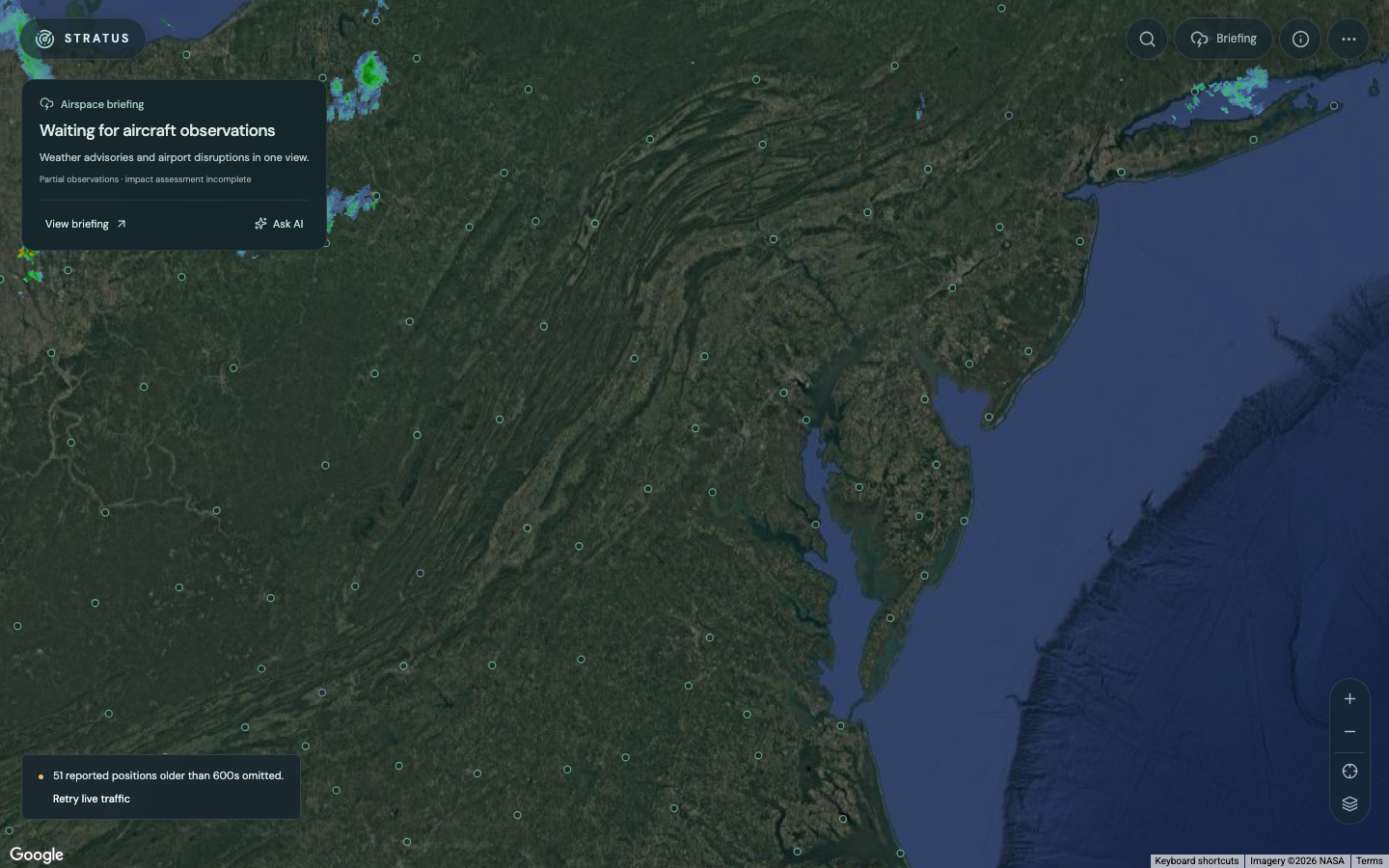
Stratus · Built with an agent swarm
One hour of human work. More than 80 combined agent-hours. The creator’s account of a four-hour build, with a look inside the application today.
Inside the Stratus buildS = total degree of α > 0 · c₀ = 1
theorem coefficients_nonneg
    (c w : Index → ℝ)
    (hc0 : c 0 = 1)
    (hw : ∀ β, 0 ≤ w β)
    (hrec : ∀ α : Index, α ≠ 0 →
      (degree α : ℝ) * c α =
        ∑ β ∈ (box α).erase 0, w β * c (α - β)) :
∀ α, 0 ≤ c α := byMath research · Ongoing
Read the equations, inspect the Lean proofs, and follow the research with a plain-English TL;DR.

Design & development
From rejected concepts to custom Blender models and an interactive browser scene.
Explore the redesign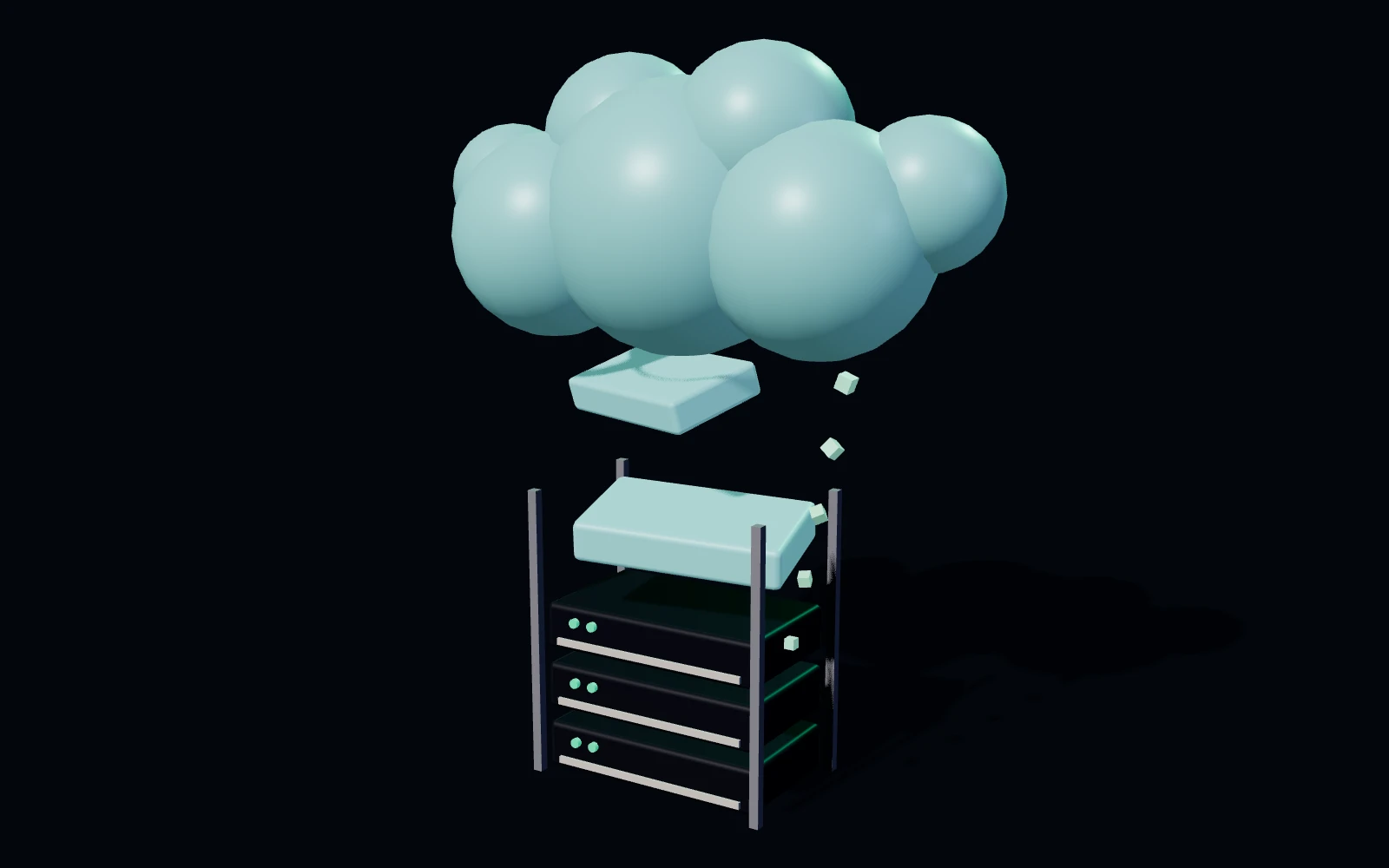
Software delivery
Explore the working site and the build record: scoped tasks, review and verified corrections.
Explore the recorded buildSecurity & audit
The record above is not only for you. Each coordination event is committed before it is delivered, with the attribution its runtime supplies, and kept where a later rule can read it. Coverage views help identify windows where the pipeline was not receiving.
Recorded windows, and the one in the middle where the pipeline was not receiving. A gap is stored as a gap rather than closed over, because a record that hides its blind spots is the one an auditor cannot use.
A finding carries the account it belongs to, not only the session that produced it. Sessions are ephemeral; the person answering for the work is not.
Absence gets a table of its own. The record reports the windows the audit pipeline was not receiving, so a reviewer can see where it is incomplete instead of assuming it is whole.
With captured history on disk, a rule written today runs backwards over events captured long before it existed. You are not limited to what you thought to watch for at the time.
Which agent touched this repository, under whose account, on what machine. Orchard produces the record an auditor asks for. What it proves depends on the coverage it reports alongside it.
The operating model
Connect the people who own the outcome with the agents, knowledge and machines doing the work.
 Orchard ChatWalkthrough · sample content
Start with the team’s objective.
Select the brief or a session to look inside.
Teams · Knowledge · Mesh
Trellis · memory & token reuse
Trellis gives agents a place to recall previous work. See the memory, token usage and reuse recorded in the workspace where we build Orchard.
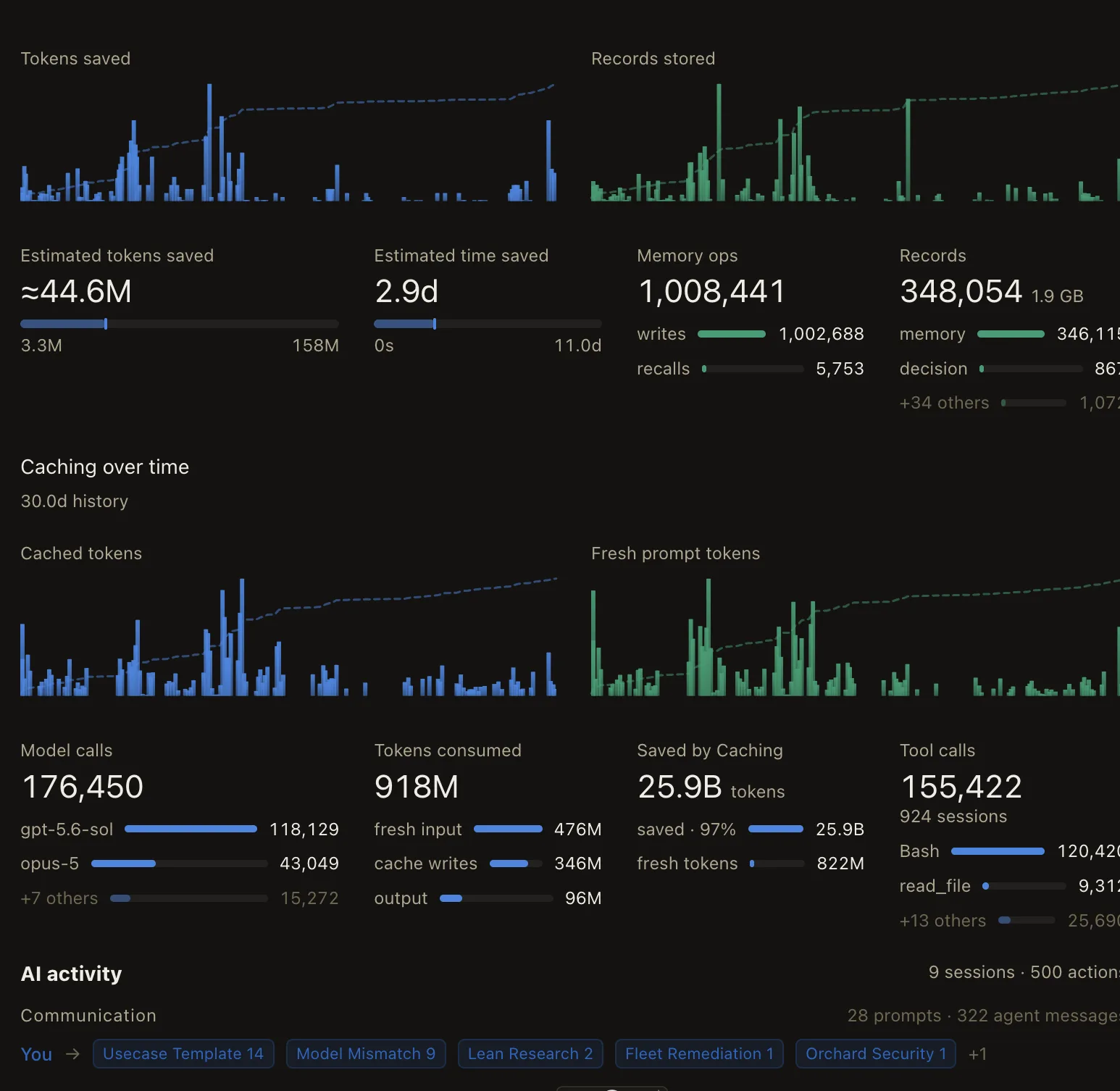
Keep findings available to the next agent. The saved history below estimates the repeated work avoided through recall.
The screenshot’s 44.6M-token estimate spans 3.3M–158M. Its 2.9 days estimate is model compute, not human time. These are modeled savings, not measured reductions.
All-time consumed tokens · rounded values from the snapshot
97% prompt cache share. This does not represent a 97% reduction in cost.
One workspace’s recorded usage, not a benchmark or a typical result. Provider caching and Trellis recall are separate mechanisms.
Read the methodologyUsage & reuse
Aug 14, 2026, 12:50 – Sep 13, 2026, 06:45 UTC · 2,799 saved observations
| Interval start | tokens | Cumulative |
|---|---|---|
| Aug 14, 2026, 12:50 | 1,260,000 | 1,260,000 |
| Aug 14, 2026, 18:50 | 980,000 | 2,240,000 |
| Aug 15, 2026, 00:50 | 130,000 | 2,370,000 |
| Aug 15, 2026, 06:50 | 0 | 2,370,000 |
| Aug 15, 2026, 12:50 | 470,000 | 2,840,000 |
| Aug 15, 2026, 18:50 | 230,000 | 3,070,000 |
| Aug 16, 2026, 00:50 | 500,000 | 3,570,000 |
| Aug 16, 2026, 06:50 | 40,000 | 3,610,000 |
| Aug 16, 2026, 12:50 | 410,000 | 4,020,000 |
| Aug 16, 2026, 18:50 | 40,000 | 4,060,000 |
| Aug 17, 2026, 00:50 | 480,000 | 4,540,000 |
| Aug 17, 2026, 12:50 | 900,000 | 5,440,000 |
| Aug 17, 2026, 18:50 | 380,000 | 5,820,000 |
| Aug 18, 2026, 00:50 | 640,000 | 6,460,000 |
| Aug 18, 2026, 06:50 | 0 | 6,460,000 |
| Aug 18, 2026, 12:50 | 360,000 | 6,820,000 |
| Aug 18, 2026, 18:50 | 230,000 | 7,050,000 |
| Aug 19, 2026, 00:50 | 100,000 | 7,150,000 |
| Aug 19, 2026, 12:50 | 280,000 | 7,430,000 |
| Aug 19, 2026, 18:50 | 1,530,000 | 8,960,000 |
| Aug 20, 2026, 00:50 | 1,840,000 | 10,800,000 |
| Aug 20, 2026, 06:50 | 600,000 | 11,400,000 |
| Aug 20, 2026, 12:50 | 3,200,000 | 14,600,000 |
| Aug 20, 2026, 18:50 | 3,600,000 | 18,200,000 |
| Aug 21, 2026, 00:50 | 200,000 | 18,400,000 |
| Aug 21, 2026, 12:50 | 800,000 | 19,200,000 |
| Aug 21, 2026, 18:50 | 900,000 | 20,100,000 |
| Aug 22, 2026, 00:50 | 0 | 20,100,000 |
| Aug 22, 2026, 12:50 | 400,000 | 20,500,000 |
| Aug 22, 2026, 18:50 | 400,000 | 20,900,000 |
| Aug 23, 2026, 00:50 | 600,000 | 21,500,000 |
| Aug 23, 2026, 06:50 | 100,000 | 21,600,000 |
| Aug 23, 2026, 12:50 | 300,000 | 21,900,000 |
| Aug 23, 2026, 18:50 | 400,000 | 22,300,000 |
| Aug 24, 2026, 00:50 | 100,000 | 22,400,000 |
| Aug 24, 2026, 12:50 | 700,000 | 23,100,000 |
| Aug 24, 2026, 18:50 | 4,000,000 | 27,100,000 |
| Aug 25, 2026, 00:50 | 100,000 | 27,200,000 |
| Aug 25, 2026, 12:50 | 3,000,000 | 30,200,000 |
| Aug 25, 2026, 18:50 | 700,000 | 30,900,000 |
| Aug 26, 2026, 00:50 | 1,100,000 | 32,000,000 |
| Aug 26, 2026, 12:50 | 2,100,000 | 34,100,000 |
| Aug 26, 2026, 18:50 | 100,000 | 34,200,000 |
| Aug 27, 2026, 00:50 | 0 | 34,200,000 |
| Aug 27, 2026, 12:50 | 100,000 | 34,300,000 |
| Aug 27, 2026, 18:50 | 0 | 34,300,000 |
| Aug 28, 2026, 00:50 | 0 | 34,300,000 |
| Aug 28, 2026, 12:50 | 200,000 | 34,500,000 |
| Aug 28, 2026, 18:50 | 100,000 | 34,600,000 |
| Aug 29, 2026, 00:50 | 0 | 34,600,000 |
| Aug 29, 2026, 18:50 | 0 | 34,600,000 |
| Aug 30, 2026, 12:50 | 100,000 | 34,700,000 |
| Aug 30, 2026, 18:50 | 0 | 34,700,000 |
| Aug 31, 2026, 00:50 | 100,000 | 34,800,000 |
| Aug 31, 2026, 12:50 | 900,000 | 35,700,000 |
| Aug 31, 2026, 18:50 | 1,000,000 | 36,700,000 |
| Sep 1, 2026, 00:50 | 200,000 | 36,900,000 |
| Sep 1, 2026, 12:50 | 100,000 | 37,000,000 |
| Sep 1, 2026, 18:50 | 0 | 37,000,000 |
| Sep 2, 2026, 12:50 | 300,000 | 37,300,000 |
| Sep 2, 2026, 18:50 | 100,000 | 37,400,000 |
| Sep 4, 2026, 12:50 | 0 | 37,400,000 |
| Sep 4, 2026, 18:50 | 0 | 37,400,000 |
| Sep 5, 2026, 00:50 | 0 | 37,400,000 |
| Sep 5, 2026, 06:50 | 0 | 37,400,000 |
| Sep 5, 2026, 12:50 | 100,000 | 37,500,000 |
| Sep 5, 2026, 18:50 | 0 | 37,500,000 |
| Sep 6, 2026, 00:50 | 0 | 37,500,000 |
| Sep 6, 2026, 06:50 | 0 | 37,500,000 |
| Sep 6, 2026, 12:50 | 200,000 | 37,700,000 |
| Sep 6, 2026, 18:50 | 100,000 | 37,800,000 |
| Sep 7, 2026, 00:50 | 0 | 37,800,000 |
| Sep 7, 2026, 12:50 | 100,000 | 37,900,000 |
| Sep 7, 2026, 18:50 | 100,000 | 38,000,000 |
| Sep 8, 2026, 00:50 | 0 | 38,000,000 |
| Sep 8, 2026, 12:50 | 0 | 38,000,000 |
| Sep 8, 2026, 18:50 | 0 | 38,000,000 |
| Sep 9, 2026, 00:50 | 0 | 38,000,000 |
| Sep 9, 2026, 06:50 | 0 | 38,000,000 |
| Sep 9, 2026, 12:50 | 0 | 38,000,000 |
| Sep 9, 2026, 18:50 | 200,000 | 38,200,000 |
| Sep 10, 2026, 00:50 | 0 | 38,200,000 |
| Sep 10, 2026, 12:50 | 400,000 | 38,600,000 |
| Sep 10, 2026, 18:50 | 900,000 | 39,500,000 |
| Sep 11, 2026, 00:50 | 500,000 | 40,000,000 |
| Sep 11, 2026, 06:50 | 500,000 | 40,500,000 |
| Sep 11, 2026, 12:50 | 0 | 40,500,000 |
| Sep 11, 2026, 18:50 | 700,000 | 41,200,000 |
| Sep 12, 2026, 12:50 | 1,300,000 | 42,500,000 |
| Sep 12, 2026, 18:50 | 900,000 | 43,400,000 |
| Sep 13, 2026, 00:50 | 900,000 | 44,300,000 |
| Interval start | records | Cumulative |
|---|---|---|
| Aug 14, 2026, 12:50 | 7,465 | 7,465 |
| Aug 14, 2026, 18:50 | 6,993 | 14,458 |
| Aug 15, 2026, 00:50 | 1,734 | 16,192 |
| Aug 15, 2026, 06:50 | 1 | 16,193 |
| Aug 15, 2026, 12:50 | 3,143 | 19,336 |
| Aug 15, 2026, 18:50 | 1,755 | 21,091 |
| Aug 16, 2026, 00:50 | 3,966 | 25,057 |
| Aug 16, 2026, 06:50 | 441 | 25,498 |
| Aug 16, 2026, 12:50 | 1,664 | 27,162 |
| Aug 16, 2026, 18:50 | 630 | 27,792 |
| Aug 17, 2026, 00:50 | 4,984 | 32,776 |
| Aug 17, 2026, 12:50 | 4,362 | 37,138 |
| Aug 17, 2026, 18:50 | 1,870 | 39,008 |
| Aug 18, 2026, 00:50 | 5,745 | 44,753 |
| Aug 18, 2026, 06:50 | 0 | 44,753 |
| Aug 18, 2026, 12:50 | 1,400 | 46,153 |
| Aug 18, 2026, 18:50 | 1,356 | 47,509 |
| Aug 19, 2026, 00:50 | 452 | 47,961 |
| Aug 19, 2026, 12:50 | 1,572 | 49,533 |
| Aug 19, 2026, 18:50 | 14,456 | 63,989 |
| Aug 20, 2026, 00:50 | 10,933 | 74,922 |
| Aug 20, 2026, 06:50 | 4,587 | 79,509 |
| Aug 20, 2026, 12:50 | 16,457 | 95,966 |
| Aug 20, 2026, 18:50 | 20,639 | 116,605 |
| Aug 21, 2026, 00:50 | 3,203 | 119,808 |
| Aug 21, 2026, 12:50 | 23,957 | 143,765 |
| Aug 21, 2026, 18:50 | 3,896 | 147,661 |
| Aug 22, 2026, 00:50 | 317 | 147,978 |
| Aug 22, 2026, 12:50 | 1,591 | 149,569 |
| Aug 22, 2026, 18:50 | 2,309 | 151,878 |
| Aug 23, 2026, 00:50 | 6,135 | 158,013 |
| Aug 23, 2026, 06:50 | 301 | 158,314 |
| Aug 23, 2026, 12:50 | 1,598 | 159,912 |
| Aug 23, 2026, 18:50 | 1,492 | 161,404 |
| Aug 24, 2026, 00:50 | 548 | 161,952 |
| Aug 24, 2026, 12:50 | 2,723 | 164,675 |
| Aug 24, 2026, 18:50 | 20,726 | 185,401 |
| Aug 25, 2026, 00:50 | 1,195 | 186,596 |
| Aug 25, 2026, 12:50 | 21,719 | 208,315 |
| Aug 25, 2026, 18:50 | 12,188 | 220,503 |
| Aug 26, 2026, 00:50 | 20,078 | 240,581 |
| Aug 26, 2026, 12:50 | 12,592 | 253,173 |
| Aug 26, 2026, 18:50 | 2,543 | 255,716 |
| Aug 27, 2026, 00:50 | 468 | 256,184 |
| Aug 27, 2026, 12:50 | 1,924 | 258,108 |
| Aug 27, 2026, 18:50 | 686 | 258,794 |
| Aug 28, 2026, 00:50 | 327 | 259,121 |
| Aug 28, 2026, 12:50 | 433 | 259,554 |
| Aug 28, 2026, 18:50 | 699 | 260,253 |
| Aug 29, 2026, 00:50 | 16 | 260,269 |
| Aug 29, 2026, 18:50 | 138 | 260,407 |
| Aug 30, 2026, 12:50 | 313 | 260,720 |
| Aug 30, 2026, 18:50 | 225 | 260,945 |
| Aug 31, 2026, 00:50 | 539 | 261,484 |
| Aug 31, 2026, 12:50 | 6,278 | 267,762 |
| Aug 31, 2026, 18:50 | 15,199 | 282,961 |
| Sep 1, 2026, 00:50 | 7,591 | 290,552 |
| Sep 1, 2026, 12:50 | 892 | 291,444 |
| Sep 1, 2026, 18:50 | 4 | 291,448 |
| Sep 2, 2026, 12:50 | 2,446 | 293,894 |
| Sep 2, 2026, 18:50 | 807 | 294,701 |
| Sep 4, 2026, 12:50 | 93 | 294,794 |
| Sep 4, 2026, 18:50 | 1,833 | 296,627 |
| Sep 5, 2026, 00:50 | 331 | 296,958 |
| Sep 5, 2026, 06:50 | 0 | 296,958 |
| Sep 5, 2026, 12:50 | 771 | 297,729 |
| Sep 5, 2026, 18:50 | 508 | 298,237 |
| Sep 6, 2026, 00:50 | 1,786 | 300,023 |
| Sep 6, 2026, 06:50 | 565 | 300,588 |
| Sep 6, 2026, 12:50 | 1,313 | 301,901 |
| Sep 6, 2026, 18:50 | 1,111 | 303,012 |
| Sep 7, 2026, 00:50 | 496 | 303,508 |
| Sep 7, 2026, 12:50 | 2,208 | 305,716 |
| Sep 7, 2026, 18:50 | 2,540 | 308,256 |
| Sep 8, 2026, 00:50 | 563 | 308,819 |
| Sep 8, 2026, 12:50 | 1,988 | 310,807 |
| Sep 8, 2026, 18:50 | 1,671 | 312,478 |
| Sep 9, 2026, 00:50 | 117 | 312,595 |
| Sep 9, 2026, 06:50 | 546 | 313,141 |
| Sep 9, 2026, 12:50 | 173 | 313,314 |
| Sep 9, 2026, 18:50 | 2,167 | 315,481 |
| Sep 10, 2026, 00:50 | 440 | 315,921 |
| Sep 10, 2026, 12:50 | 3,225 | 319,146 |
| Sep 10, 2026, 18:50 | 3,337 | 322,483 |
| Sep 11, 2026, 00:50 | 2,198 | 324,681 |
| Sep 11, 2026, 06:50 | 1,370 | 326,051 |
| Sep 11, 2026, 12:50 | 12 | 326,063 |
| Sep 11, 2026, 18:50 | 797 | 326,860 |
| Sep 12, 2026, 12:50 | 7,967 | 334,827 |
| Sep 12, 2026, 18:50 | 3,769 | 338,596 |
| Sep 13, 2026, 00:50 | 984 | 339,580 |
Bars show counter increases recorded in each 6-hour group; observation gaps are not interpolated. Dashed lines accumulate those increases within this range, using their own scales. Record increases are not completed tasks or the current store population. No counter drops in this range.
Saved browser observations captured Sep 13, 2026, 06:50 UTC. Recall savings are modeled avoided work, not measured human time or provider cache usage.
The operator workspace
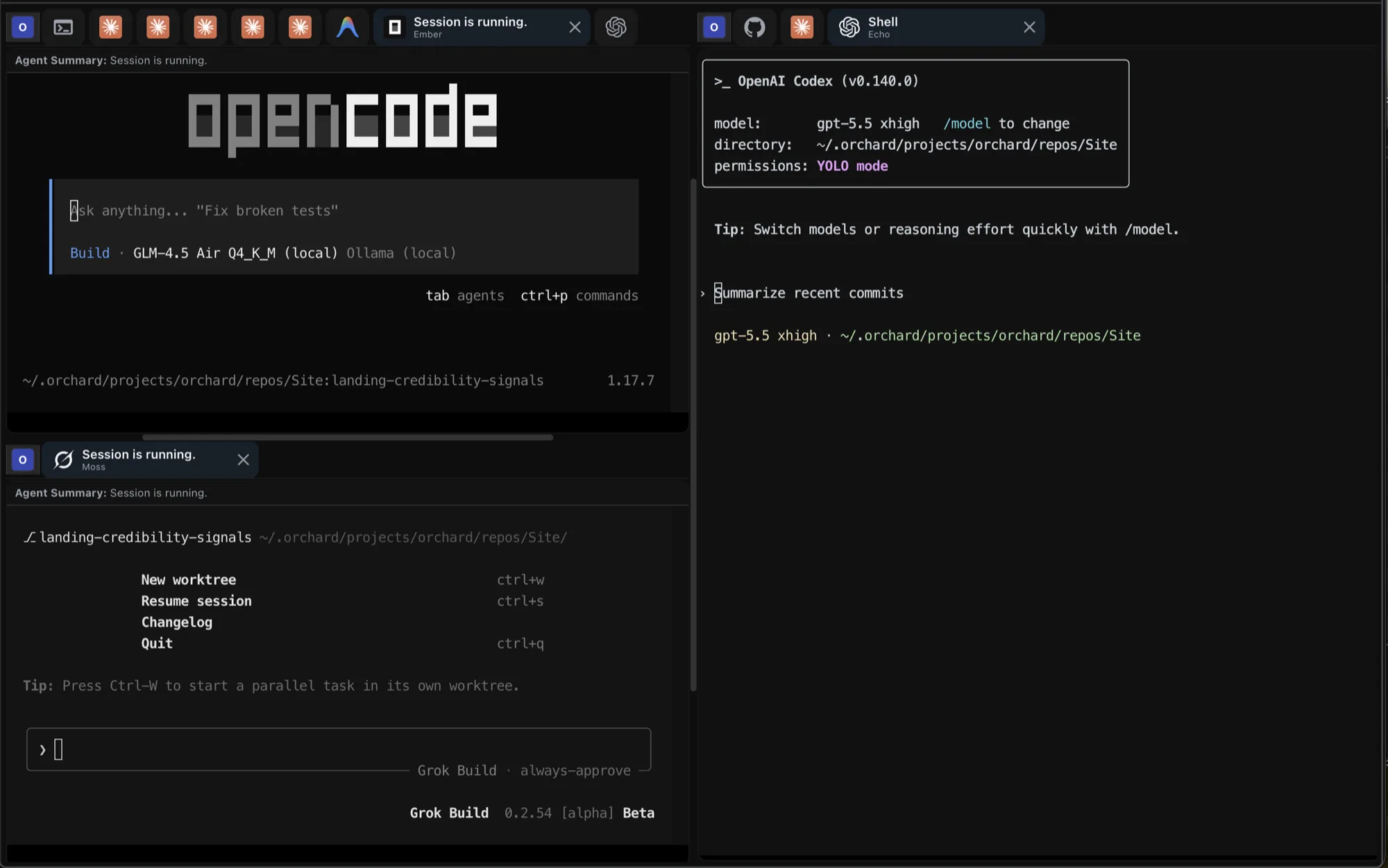
Connect the operating model to the work on each machine. Contributors bring supported agent runtimes, a browser and configured project tools into their workspace.
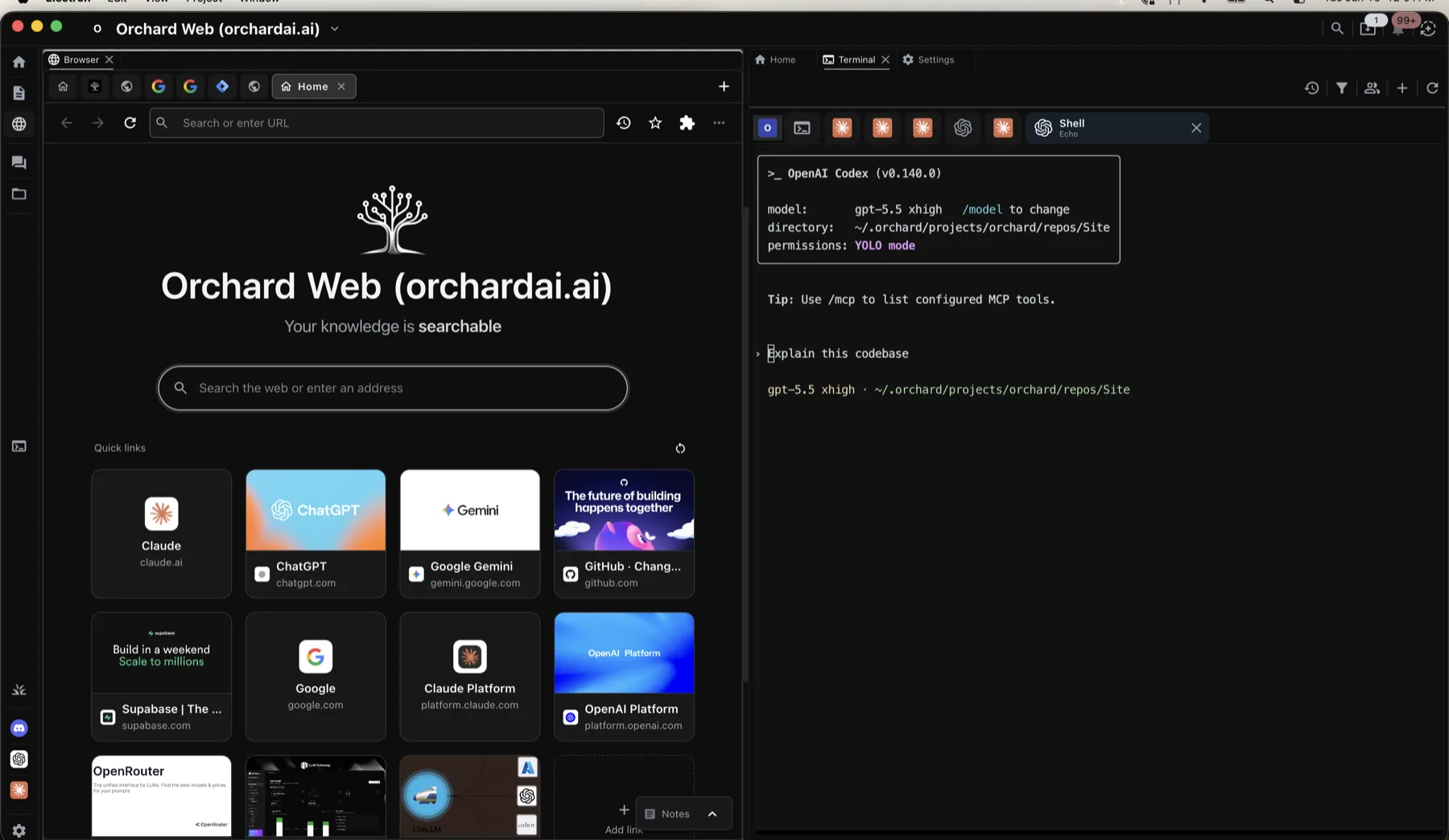
Plugins and integrations
Messaging platforms your agents can speak through, and the apps you sign in to and pin inside the workspace. Discord, WhatsApp, Slack, Outlook, Teams, Gmail, and the rest of Google Workspace and Microsoft 365.
Seedpacks bundle MCP servers, so a session can reach tools beyond this list.
Orchard connects your team’s agent sessions, tools, memory and machines. Orchard Chat is a central place to delegate work, follow up with sessions and receive their reports, while people retain responsibility for the outcome.
Because work spans sessions, tools and teammates, and an agent loop does not. For one small task in one session, your agent is already enough.
Not automatically. Coordinated swarming can reduce duplicated work: agents take distinct scopes, share findings and reuse earlier output as input. That can avoid paying several models to repeat the same investigation or plan. The benefit depends on task fit and the cost of coordination, context and review; adding agents alone does not guarantee savings.
One model’s work supports the others. A capable model can produce a reviewed plan or resolve a hard question; lower-cost or local models can use that result as context for suitable follow-up tasks. Orchard helps carry the knowledge between them. Your team still selects the models and verifies the result.
Tool access, hooks and permissions differ between runtimes. Orchard Chat’s model choices are separate from worker runtime and model settings. Hosted options such as DeepSeek also differ from compatible models running through a local runtime.
Rules, skills and memory are plain files on your machine that you can read and delete. Where data goes depends on the provider and integrations you configure.
Start with your team
Start with a shared project. Connect your people, agents and tools, then extend the work across your connected machines.
Free during the beta.
Remote MCP is in early access. Keep Orchard running and signed in on your computer. MCP setup and supported apps
npm install -g @orchard-ai/cliUse the setup guide to connect your workspace.





 Discord
 WhatsApp
 Slack
Slack Telegram
 Signal
 Microsoft Teams
 iMessage
 Matrix
 LINE
LINE Outlook
 Gmail
Gmail Google Calendar
 Google Drive
 Google Docs
 Google Sheets
 Google Slides
 Google Meet
 Word
Word Excel
Excel PowerPoint
 OneNote
 OneDrive
 Jira
Jira Stripe
 Supabase
 ChatGPT
 Claude